
800 watts. That’s all the law allows you to inject at home, into your own domestic network (the limit varies slightly by country, but it hovers around this). The EcoFlow Stream adheres to this limit strictly… and still manages to handle up to 2000 W of solar panels. I’ll show you the trick; it’s almost too good to be legal (it is, I promise).
A little context before we start: I’ve been living with the Stream Ultra under my desk for almost a year now, in the heat of the Algarve, and a complete setup has been running at a friend’s place for over six months. So here, no copied product sheet, no rushed two-day test, just real experience (with the hassles that come with it, we’ll talk about that later).
Our verdict on EcoFlow STREAM Ultra/Pro Home Solar Battery
Benefits
- 1920 Wh home storage, expandable
- Plug-and-play, no electrician
- App monitoring of production and savings
Disadvantages
- Self-consumption setup, check local grid rules
- A larger upfront investment
A simple way into home solar self-consumption: store 1920 Wh and use it when it counts, without rewiring.
EcoFlow STREAM Ultra/Pro Home Solar Battery promo code
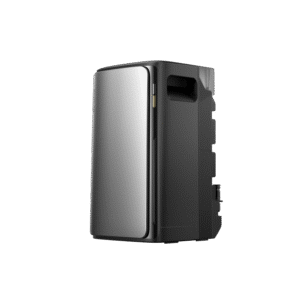 Out of stock
EcoFlow STREAM Ultra/Pro Home Solar Battery
CARO5*
*Verified price on 1 October 2026. The final price may vary.
Ecoflow Stream presentation video
Who is the EcoFlow Stream for?
The Stream is designed for home use, period. It’s for those who want to enjoy solar energy at home, without having to call an installer, and without getting into a rigid and overpriced setup. EcoFlow focuses here on the smart plug and play: you set up your panels, connect the battery, and start producing and storing energy right away.
So, who is it for?
- For those who want a simple solution, without major renovations,
- for those looking for an alternative to large traditional photovoltaic installations,
- and for those who want to have control over their energy, without being 100% dependent on the grid.
And a big strong point: depending on the chosen configuration, you can sometimes cover several hundred square meters. This isn’t just something for a student studio; it can really adapt to an entire house, provided you calibrate it well.
Another clever thing is that it’s completely modular. You start small with a basic kit, and you add batteries, panels, and inverters over time, at your own pace and according to your budget. In short, if you’re looking for a home solution that is scalable and hassle-free, this is clearly for you.
How does it work?
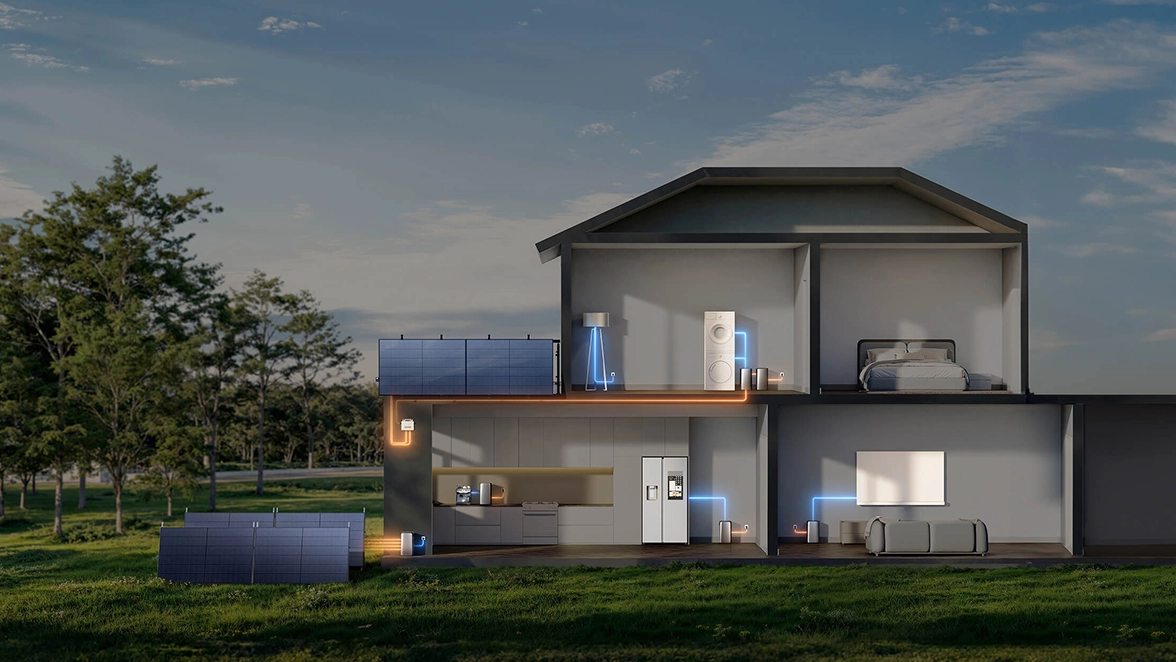
The EcoFlow Stream is a well-thought-out hybrid system, combining solar panels, a battery, and a micro-inverter in the same ecosystem.
A mix between PowerStream and home batteries
The Stream is the crossover between the PowerStream (for direct injection into the grid) and storage batteries like Delta II or Delta Pro. You start with 1.92 kWh of storage (one Stream Ultra unit) and can scale up to 11.52 kWh with extensions.
Solar panels for input, usable electricity for output
The panels (up to 2000 W of input via 4 MPPT inputs) power the micro-inverter, which sends the energy back into your domestic network. This is the principle of PowerStream, but with a much larger and more scalable capacity.
Storing excess energy
The Stream goes further with its Stream AC Pro batteries, which store unused energy for background consumption (fridge, standby, etc.). They claim a lifespan of up to 6000 cycles.
Two battery formats available
- Stream Ultra: battery with integrated micro-inverter, output up to 1200 W, or 2300 W in parallel.
- AC Pro: standalone storage batteries, with 220 V sockets to directly connect powerful devices.
An installation that evolves with you
You start small and then develop: the Stream is 100% modular. You add batteries, panels, and power over time, according to your needs.
The table below summarizes the different possible configurations:
| Configuration | Storage capacity | Max output power | Number of panels | Covered area (approximate) | Possible extension |
|---|---|---|---|---|---|
| EcoFlow Stream Ultra (base) | 1.92 kWh | 1,200 W | 2 panels 520 W | ≈ 90–119 m² | Yes (up to 11.52 kWh) |
| EcoFlow Stream Ultra + extension | 3.84 kWh | 2,300 W (in parallel) | 4 panels 520 W | ≈ 120–149 m² | Yes (adding AC Pro) |
| EcoFlow Stream Ultra + 2 AC Pro | 7.68 kWh | 2,300 W | 4 panels 520 W | ≈ 150–250 m² | Yes (still expandable) |
| EcoFlow Stream Ultra + 3 AC Pro | 11.52 kWh | 2,300 W | 6 panels (4 × 520 W + 2 × 450 W) | ≈ 250–350 m² | Maximal |
What savings can you expect with the EcoFlow Stream?
So, I pulled out the calculator and did all the work for you (yes, I get bored sometimes). Starting from a fairly conservative UK electricity rate (around £0.20 per kWh), I estimated what each configuration could save you over a year.
With the base config, the Stream Ultra (1.92 kWh), we’re looking at around £202 per year, which translates to nearly 1,000 kWh injected into your network. Moving to the beefier version, the Stream Ultra + 2 AC Pro (7.68 kWh), we climb to about £605 per year, with an estimated production of 3,000 kWh/year. And for the more demanding users, the Stream Ultra + 3 AC Pro (11.52 kWh) brings us to a whopping £907 in annual savings, with nearly 4,500 kWh produced. Of course, all this will depend on your sunlight exposure, the orientation of the panels, and your consumption, but it already gives a good idea of the potential.
A little transparency here: these figures remain theoretical estimates. The good news is that I have much better data to offer you a bit further down in the article: the real readings from a friend who has been operating the complete installation since the beginning of the year. Here, we won’t be in the calculator, but in real life.
Estimation: Which EcoFlow Stream installation is right for you?
We created a little calculator that allows you to estimate the best version of EcoFlow Stream for your home. Be careful, this remains an estimate and deserves further exploration.
How does it work?
Look at your electricity bill (or on your supplier’s website) for the number of kWh you consume per day. If you only have a monthly value, divide it by the number of days to get a daily estimate.
What can be powered and for how long?
The table below gives you an idea of the devices you can run based on the configurations. We are talking about estimates based on the average consumption of each device and the capacity of the batteries. Be careful to read carefully: this is the number of hours for a single device, not if you plug everything in at once (there, it will obviously drop quickly).
| Device | Average consumption | Stream Ultra (1.92 kWh) | Stream Ultra + 2 AC Pro (7.68 kWh) | Stream Ultra + 3 AC Pro (11.52 kWh) |
|---|---|---|---|---|
| LED bulb | 10 W | ≈ 8 days | ≈ 32 days | ≈ 48 days |
| LED TV | 100 W | ≈ 19 h | ≈ 76 h | ≈ 115 h |
| Refrigerator | 150 W | ≈ 12 h | ≈ 51 h | ≈ 77 h |
| Electric oven | 2000 W | ≈ 1 h | ≈ 3.8 h | ≈ 5.7 h |
| Washing machine | 500 W | ≈ 3.8 h | ≈ 15.3 h | ≈ 23 h |
| Air conditioner | 2000 W | ≈ 1 h | ≈ 3.8 h | ≈ 5.7 h |
| Laptop | 50 W | ≈ 38 h | ≈ 153 h | ≈ 230 h |
| Games console | 120 W | ≈ 16 h | ≈ 64 h | ≈ 96 h |
| Wi-Fi router | 10 W | ≈ 8 days | ≈ 32 days | ≈ 48 days |
| Hair dryer | 1500 W | ≈ 1.3 h | ≈ 5.1 h | ≈ 7.7 h |
EcoFlow Stream: technical specifications
Below is a summary of the technical specifications, taken directly from our product sheet (always up to date):
Technical specifications: EcoFlow STREAM Ultra/Pro Home Solar Battery
| Capacity | 1,920.00 Wh |
|---|---|
| Net Weight | 23.10 kg (50.93 lb) |
| Dimensions | 284 x 255 x 458 |
| Max AC Output | 2,300.00 W |
| Solar Charging | 2,000.00 W |
| Wi-Fi | ✓ |
| Bluetooth | ✓ |
| Warranty | 10.00 an |
| Noise | 30.00 dB |
| Life Cycles | 6000 |
| Operating Temperature | - |
| Waterproof Rating | 65.00 % |
| Number of MPPT Inputs | 4.00 |
| Grid-Tied AC Output | 800.00 W |
| AC Charging Input | 10.00 A |
EcoFlow has started a trend, and competitors have followed suit
One thing I find interesting in hindsight: when EcoFlow released the Stream, this famous idea of smartly reinjecting into the grid while keeping direct outlets was quite new in the domestic market. And of course, as soon as a product takes off, other brands rush in (it’s fair game).
As a result, today, EcoFlow is no longer alone. Aferiy has arrived with its large 6200 W domestic systems, and AllPowers has rolled out its BS2500 and BS5000, two plug-and-play home storage systems that I have tested myself. I’m actually working with several of these brands, so let me be frank: each has its strengths, and the “best” will largely depend on your budget and needs.
Rather than selling you EcoFlow with blinders on, here’s a comparison of the technical specifications of the main systems currently available, put head-to-head. Capacity, output power, expansion, warranty: it’s up to you to see who checks your boxes:
Home storage systems compared

£1659,00
See the product
|

£1199,00
See the product
|
£1999,00
See the product
|
|
|---|---|---|---|
| Capacity | 1,920.00 Wh | 2,600.00 Wh | 5,200.00 Wh |
| Net Weight | 23.10 kg (50.93 lb) | 38.80 kg (85.54 lb) | 65.00 kg (143.30 lb) |
| Dimensions | 284 x 255 x 458 | 300 x 284.3 x 587.5 | 456 x 284.3 x 587.5 |
| Warranty | 10.00 an | 5.00 an | 5.00 an |
| Noise | 30.00 dB | - | - |
| Life Cycles | 6000 | 6000+ | 6000+ |
| Operating Temperature | - | -20 to +60 | -20 to +60 |
| Waterproof Rating | 65.00 % | IP65 | IP65 |
| Number of MPPT Inputs | 4.00 | 2.00 | 2.00 |
| Grid-Tied AC Output | 800.00 W | 2,400.00 W | 2,400.00 W |
| AC Charging Input | 10.00 A | - | - |
| Total Output Power | - | 2,400.00 W | 2,400.00 W |
| Application | - | ✓ | ✓ |
| UPS Function | - | ✓ | ✓ |
| Maximum Input Voltage | - | 100.00 V | 100.00 V |

AllPowers BS2500 and BS5000: our review of these home storage batteries
Here are two devices that I've kept in the back of my mind for a while, because they represent a real turning point for AllPowers, the battery brand we've been...
Read more
Aferiy Nomad 1800 & 1800 Pro: the battery test that saved our night in Bordeira
Field test of the Aferiy Nomad 1800 power station (1024 Wh, 1800 W) in the Algarve: compact format, 1000/500 W input switch, charges in under an hour, 7-year warranty. My...
Read more
I'm Xavier
I test gear over months, in the van and day to day, and I say what doesn't work. If that saves you one bad purchase, leave me your address.
Ce que vous souhaitez recevoir :
The new product, the Stream Ultra or AC battery
What does the EcoFlow Stream Ultra battery look like?
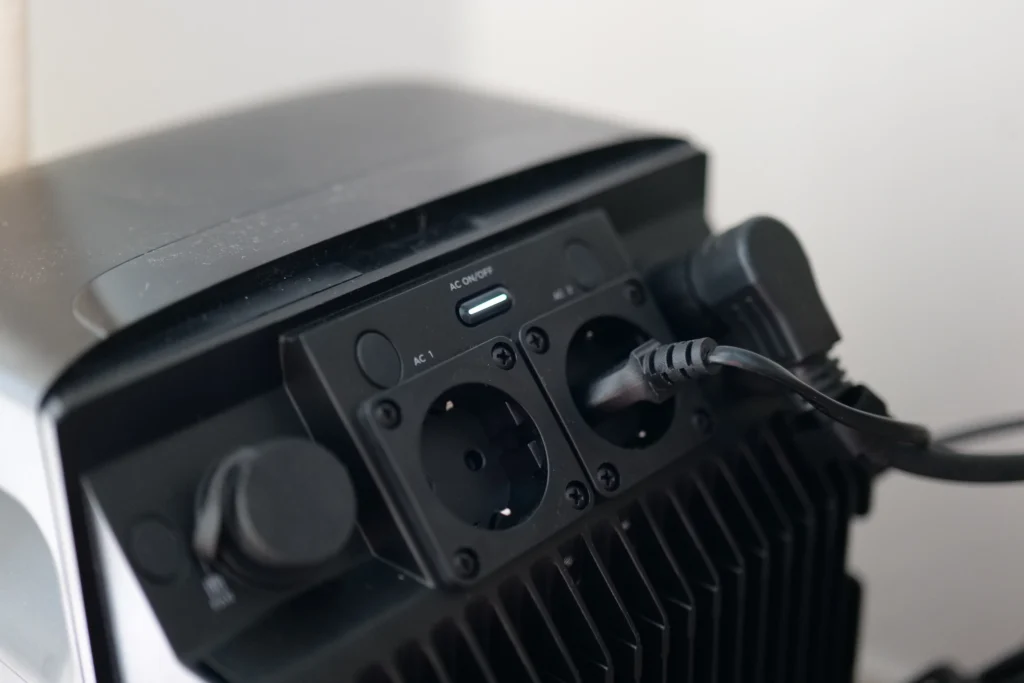
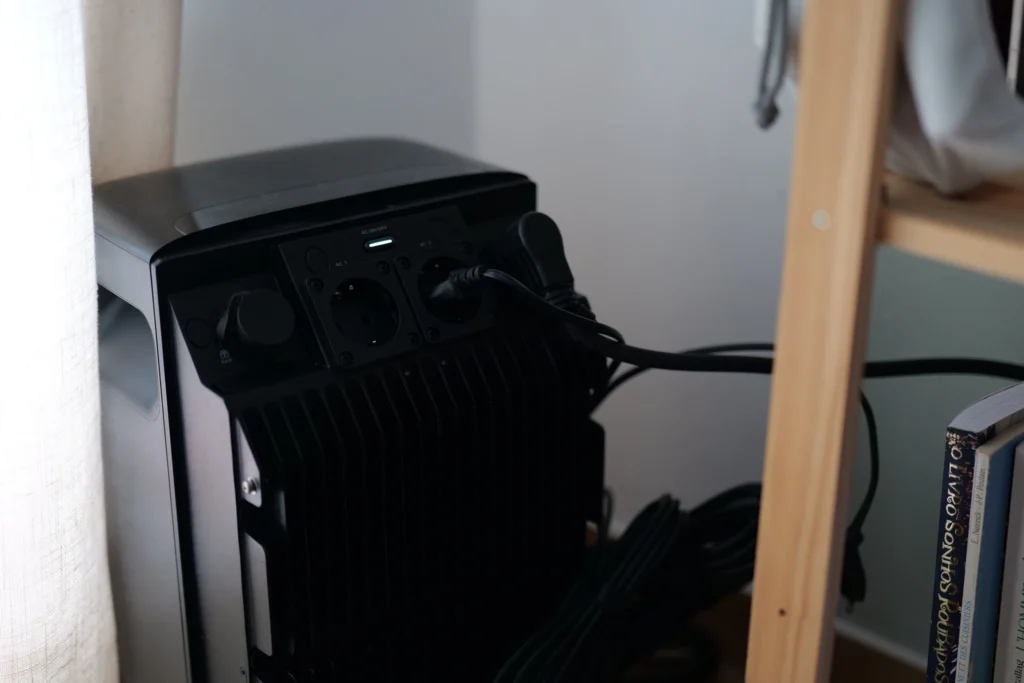
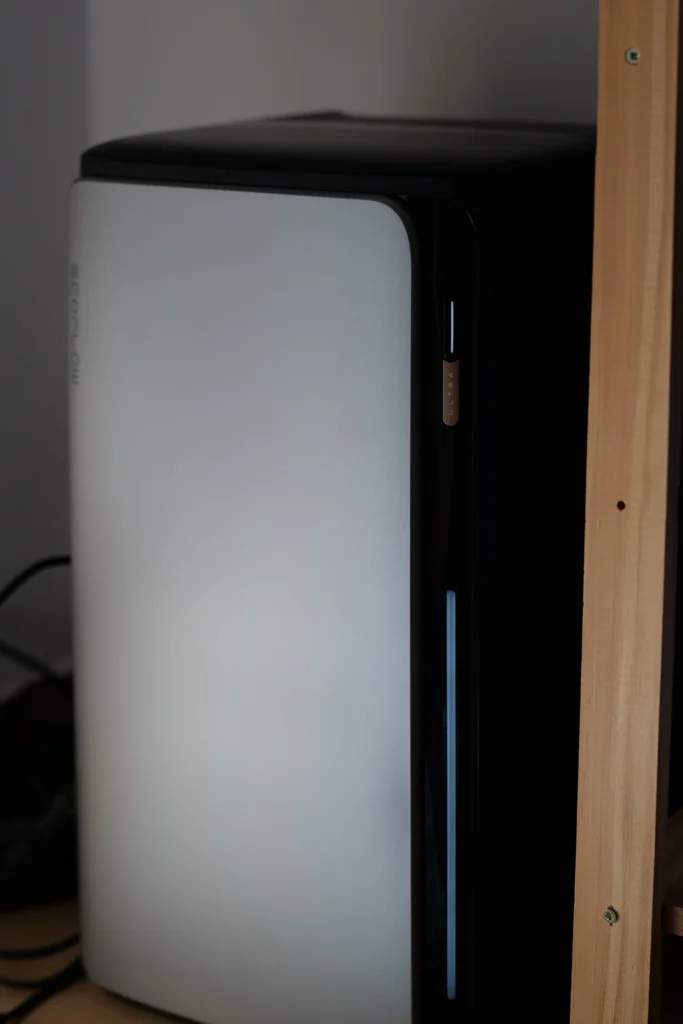
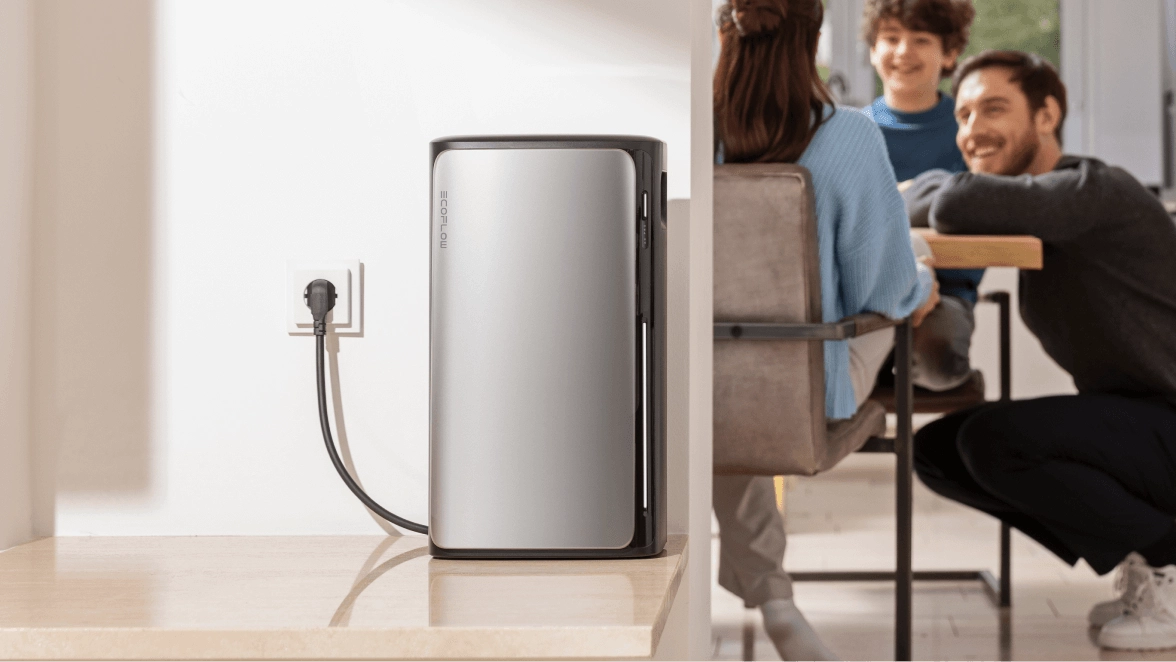
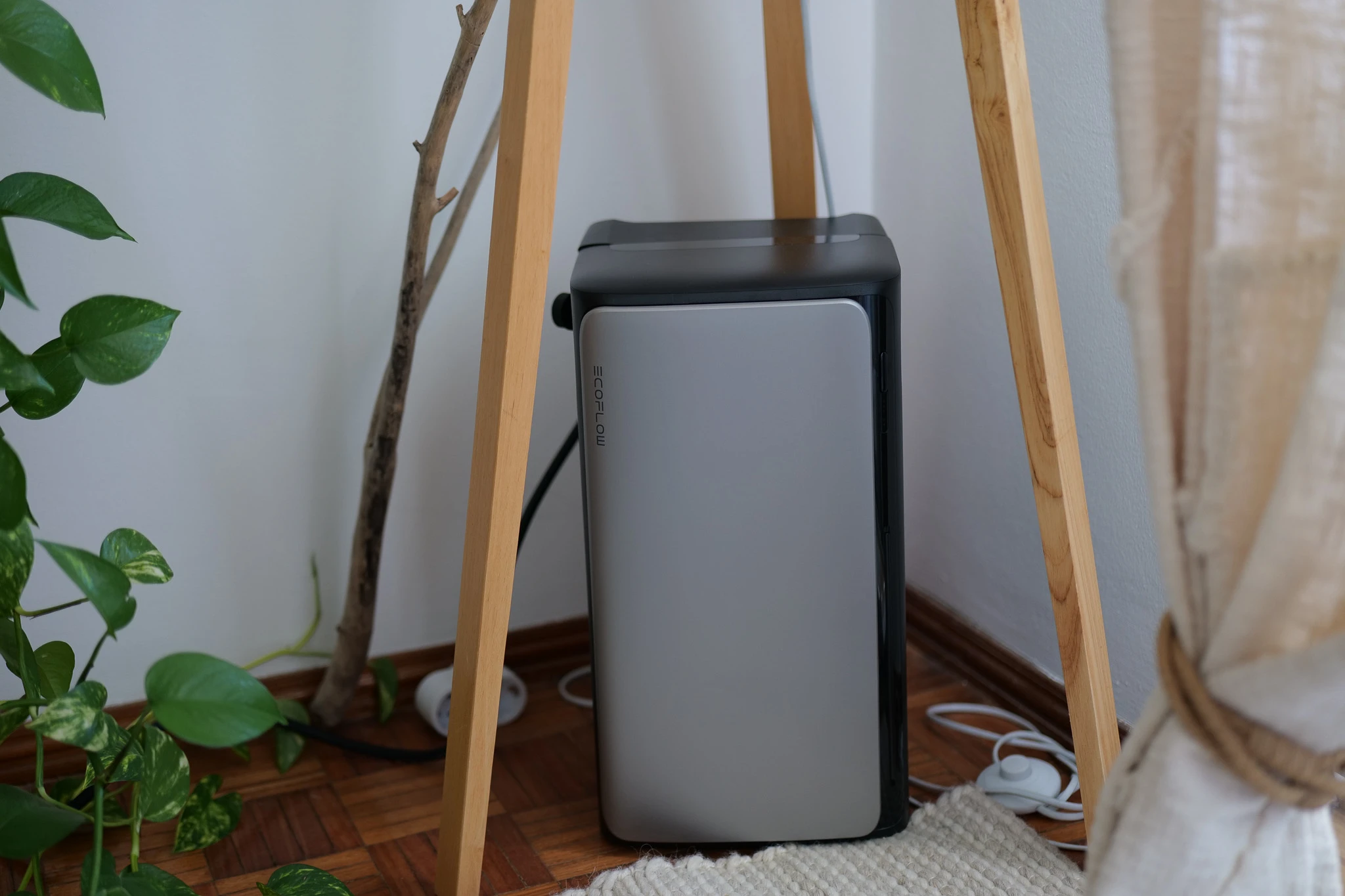
Visually, the Stream Ultra stays true to the brand’s DNA: modern, sleek, minimalist design in metallic gray and matte black. It exudes sturdiness while remaining elegant enough to fit into a contemporary interior (in my case, it ended up in the office, and honestly, it doesn’t clash).
In terms of size, it measures about 20 cm wide and just under 50 cm tall. It fits easily on a balcony, in a garden corner, in the living room, or in the office. It’s clearly a battery designed for home use, not for a technical room.
However, be cautious about the weight, each battery weighs between 20 and 30 kg. And I can tell you that when you live on the third floor without an elevator (hello), between the Stream Ultra kit, the supports, and the spare batteries, exercise is included in the price. Fortunately, the integrated handles are well-designed and save your arms a bit.
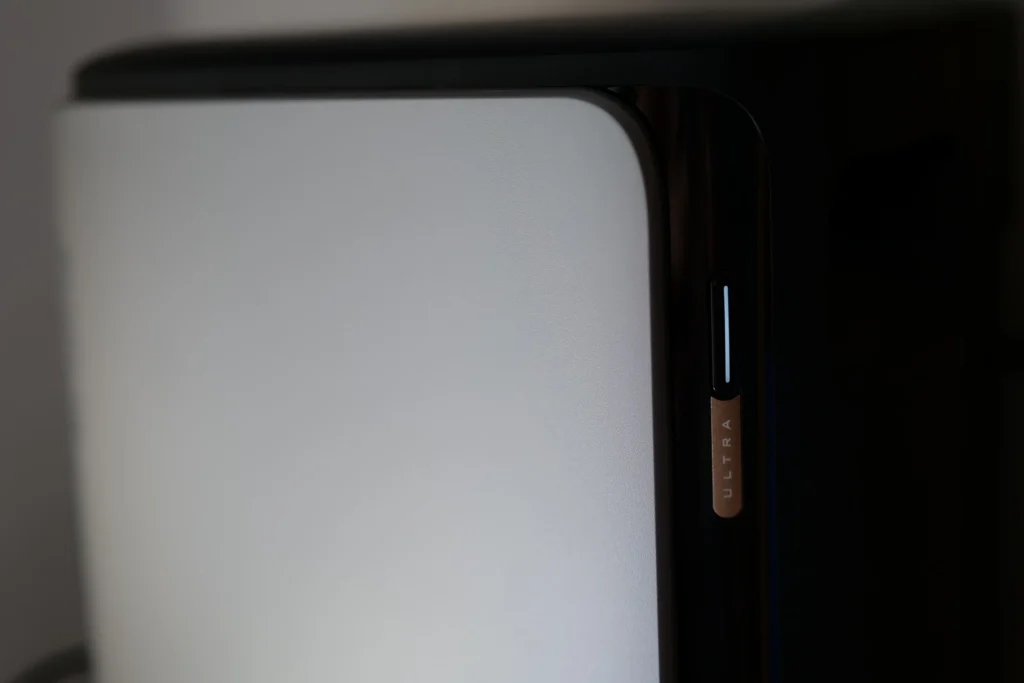
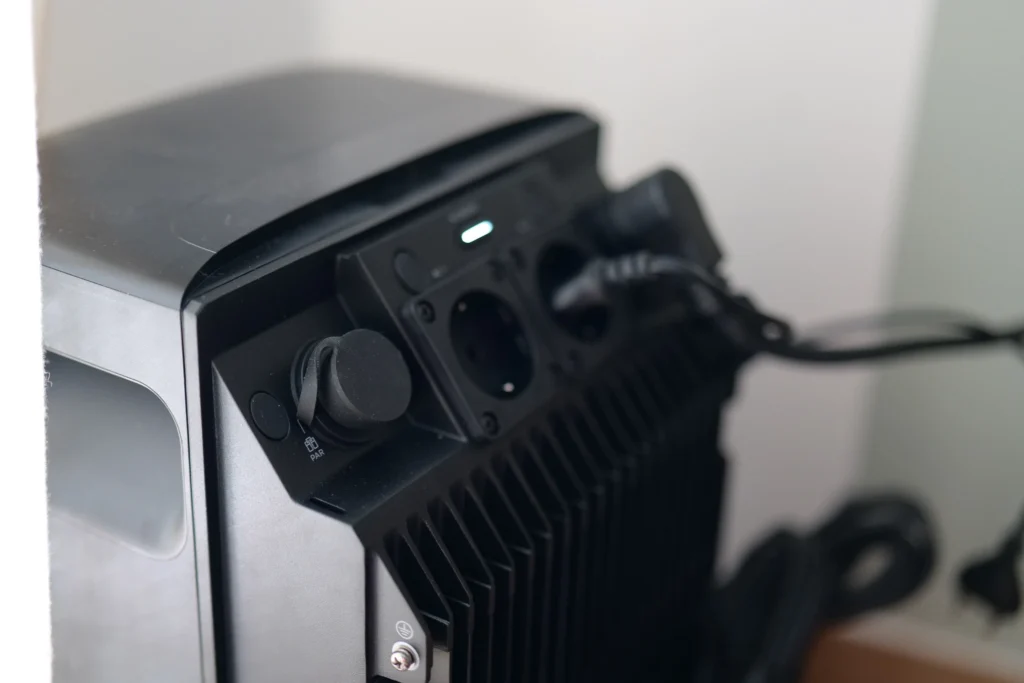
The very minimalist design is also distinguished by the absence of a classic screen. No small digital display here, just a vertical LED strip that lights up, blinks, or pulses according to the charge level. It’s elegant, but you’ll need to use the app to get precise data. A coherent minimalist choice with the product, which just requires a little adjustment time if you’re coming from a Delta 2.
By the way, I replaced my Delta 2 with this Stream Ultra to power my scooters, and I quickly realized that I needed to check the activation of the 220 V outlets in the app. Without direct visual feedback on the battery, you’re somewhat obliged to open the app to confirm that everything is working.
And how does it perform outdoors?
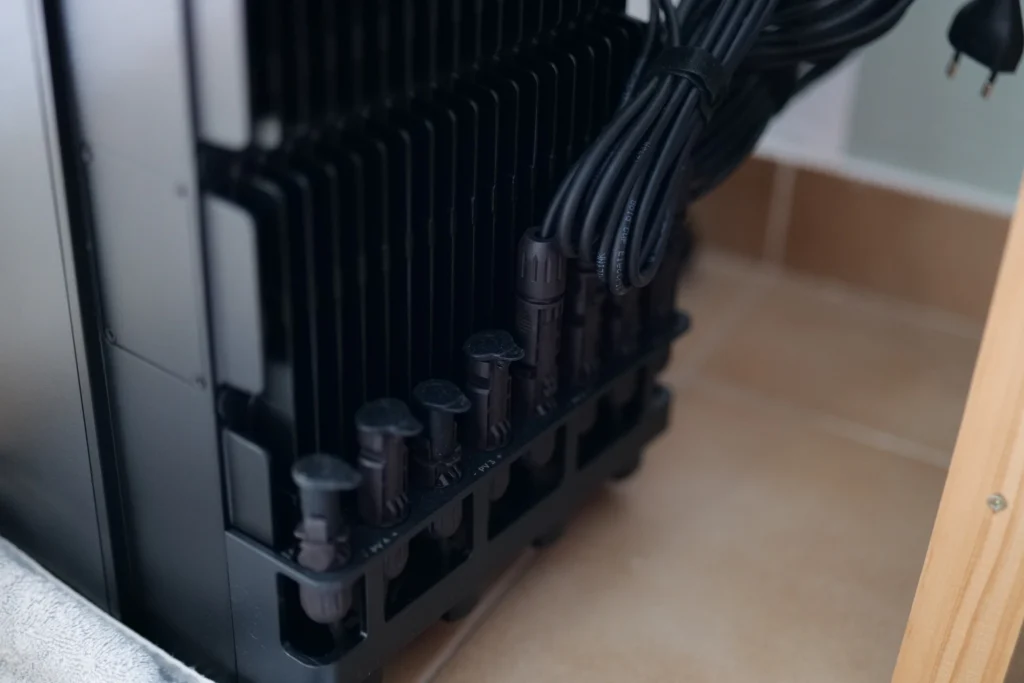
The battery comes with sturdy protective covers on all outlets, including the MC4 solar connectors. These thick plastic covers are well thought out and effectively protect against dust and splashes.
Good news: the MC4 connectors are standard, so you can connect panels from any brand, not just EcoFlow’s. This is a real strong point; you’re not locked into the ecosystem.
Would this make me want to leave it outside permanently? Not really, no. It’s beautiful, it represents a real investment, and even though its IP65 rating reassures on paper, I have a slight reservation.
Why? Because once you remove the covers to plug in the cables, I fear that the waterproofing might take a hit. Especially in heavy rain or prolonged exposure to wind and humidity. So yes, outside occasionally or under a shelter (covered terrace, balcony), but I recommend bringing it inside or well protecting it if it needs to stay exposed for a long time.
My feedback after almost a year of use
Open and practical solar compatibility
The Stream was delivered to me with three 500 W panels, which I ended up deploying at a friend’s place rather than in my apartment (on the third floor, on an urban balcony, let’s just say the solar potential is… modest). At home, I connected my own panels, two 100 W modules on the balcony, plus two others of the same caliber. And good surprise, the Stream accepts them without a hitch. Thanks to its standard MC4 connectors, you can plug in any panel, even from another brand, and without an adapter (the older EcoFlow batteries had a special connection linked to MC4, so it’s good to know that here we can do without it).
No total autonomy at my place, but a real perspective
Let’s be honest: with my limited panel area in the city, I’m not aiming for complete home autonomy. On a good day, I hope for about 300 W for 5 hours, which is still far from my consumption peak. So, when the battery starts to run low (around 20%), I unplug it from the grid to avoid damaging it. This is the limit of urban use, not a flaw of the product. For the real autonomy test in real conditions, my friend’s complete setup speaks best. And just so happens, he just sent me his readings after six months of use, so let’s take a look at that together.
The real numbers from my friend (6 months of feedback)
Enough theory, let’s get to the concrete (you were waiting for it, so was I). My friend has been running the complete setup since January, a Stream Ultra and its panels, in a real house here in Portugal. He sent me screenshots from his app, and believe me, it’s much more telling than any product sheet.
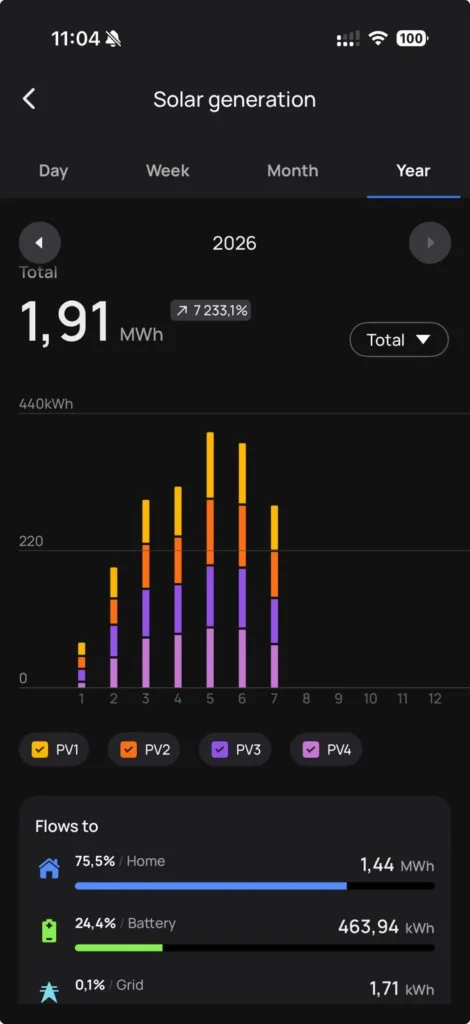
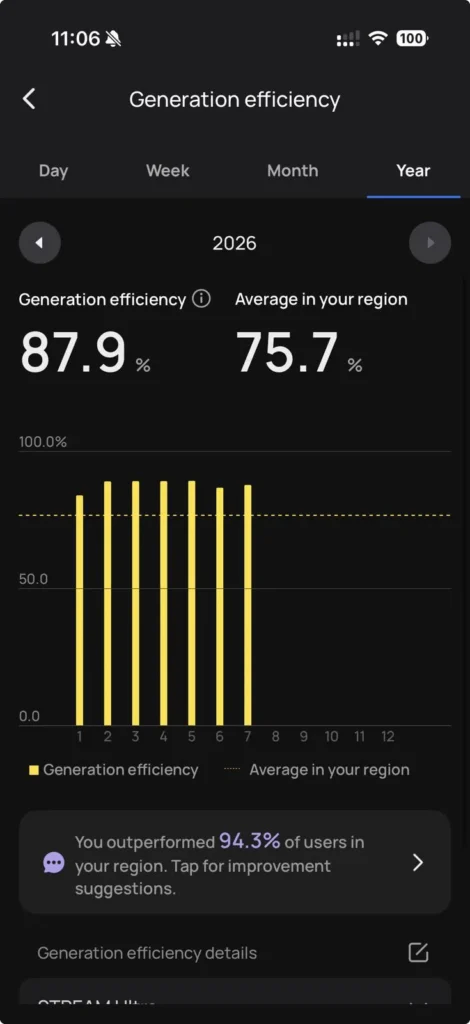
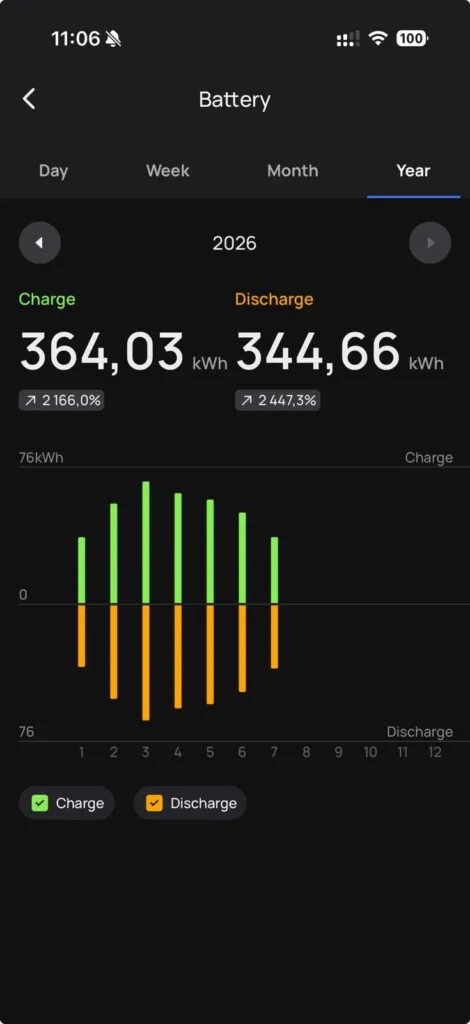
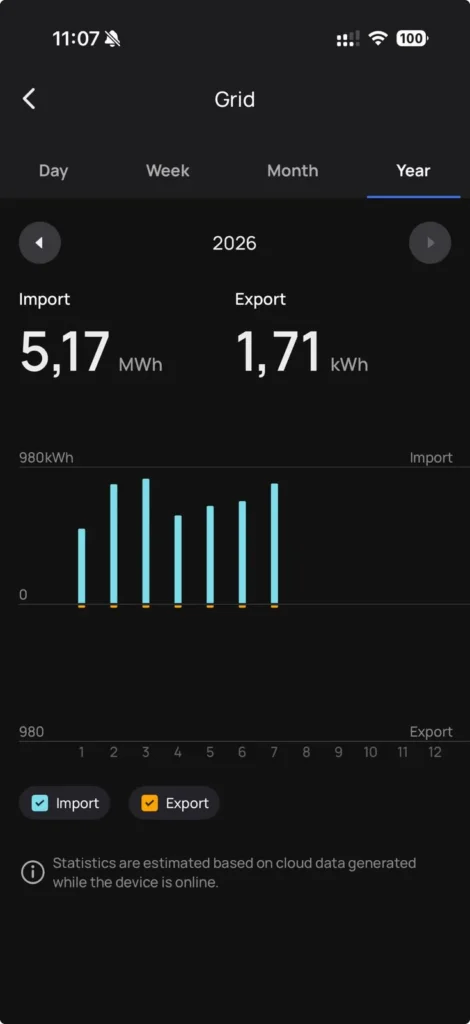
In terms of performance, his setup has already produced 1.91 MWh of solar energy in the first seven months. And the best part is that almost nothing is wasted: 75.5% of that energy goes directly into the house, 24.4% is stored in the battery, and only 0.1% goes back to the grid. Self-consumption is therefore nearly total, which is exactly the goal. His generation efficiency even climbs to 87.9%, compared to an average of 75.7% in his region (he’s doing better than 94.3% of his equipped neighbors, lucky him). And the battery handles its cycles smoothly, with 364 kWh charged for 344 kWh discharged, without ever faltering.
Now, the question that’s burning on your lips, and mine too: concretely, how much does it put in your pocket?
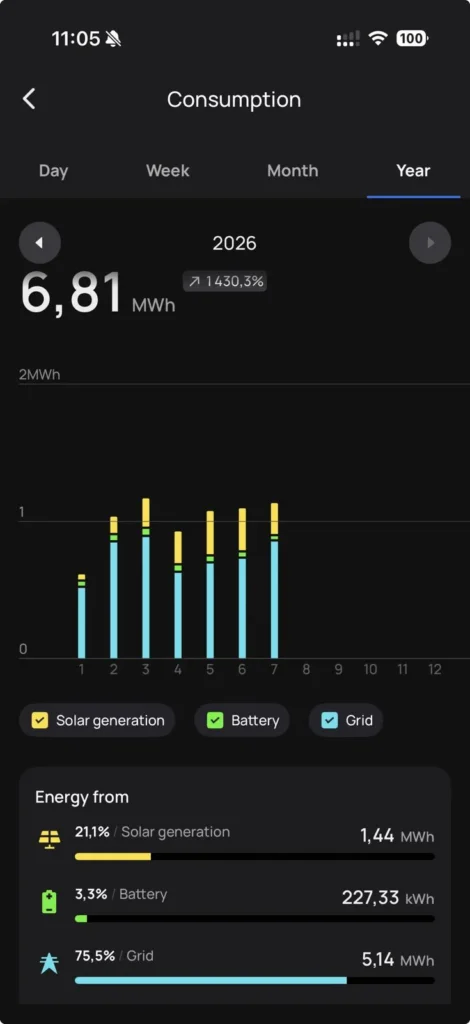
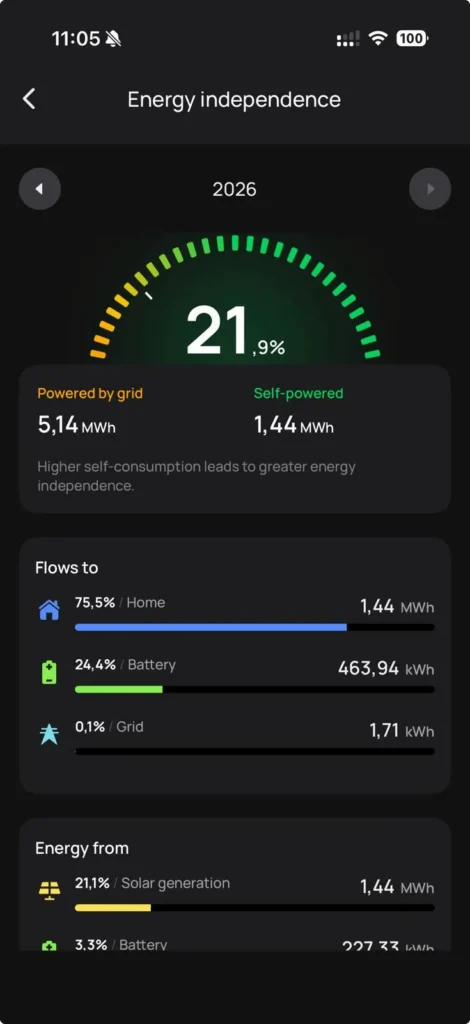
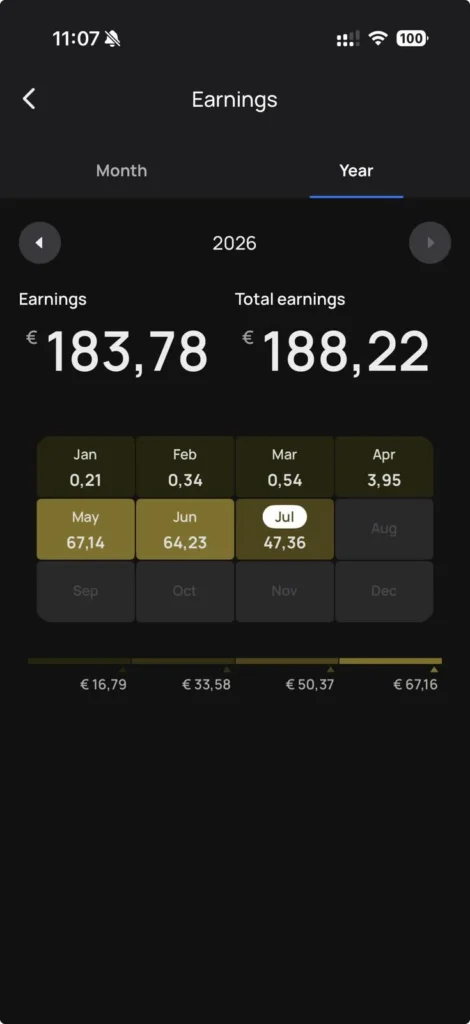
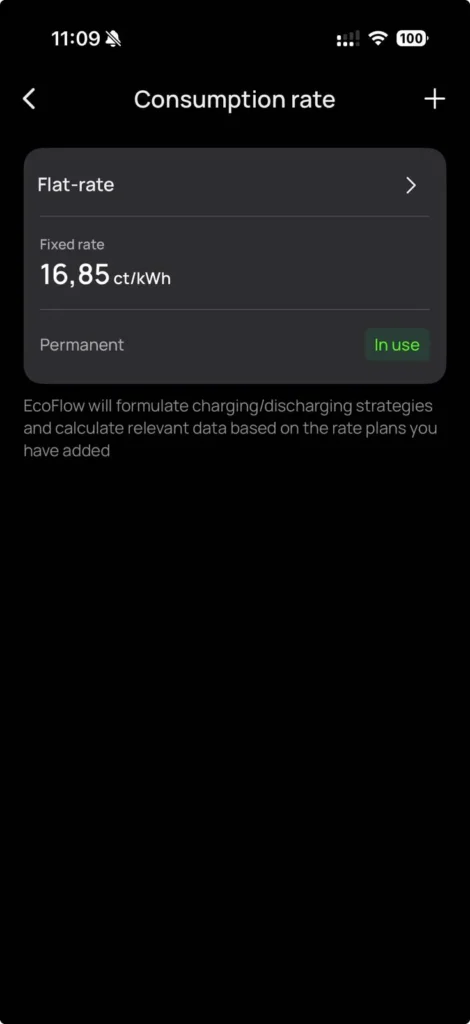
If we look at the reliable months, at the real rate: May brought in 67.14 € (approx. £58), June 64.23 € (approx. £55), and July already shows 47.36 € (approx. £41) as of the 24th of the month (so over 60 €, roughly £52, once the month is closed). And if we recalculate properly, valuing the 1.44 MWh actually self-consumed at the Faro rate, we arrive at around 243 € (approx. £209) of unpaid electricity over these seven months. And this is without counting the 344 kWh that the battery delivered on top.
Over a full year, considering that the major sunny months have already passed and that autumn will produce less, we can reasonably aim for around 400 to 450 € (approx. £345 to £385) in real savings for this installation. This is slightly below my initial theoretical estimate (£605 per year for this capacity, at a UK rate), and frankly, it makes sense: theory assumes perfect sunlight and consumption, whereas we are in real life, with a system that took a few months to ramp up. In short, the concept holds up, numbers to back it up.
An ultra-quiet battery
Under my desk, I also have a Delta Pro, which I love… except for the noise it makes during solar charging. The Stream Ultra, on the other hand, is totally silent. Really. You could place it in a bedroom, and you wouldn’t even hear it. Despite the heat of southern Portugal (in the Algarve, it regularly reaches 22 °C at night), it remains perfectly stable, showing no signs of overheating. EcoFlow opted for passive heat sinks at the back instead of noisy fans, and believe me, it makes all the difference.
The AC Pro, my only real hassle (and top-notch customer service)
I promised you the hassles, and here’s a good one. The AC Pro battery I received is simply out of order. It was well detected in the app, but stuck at 0%, impossible to recharge, impossible to update, and most importantly, impossible to restart. I tried everything, but it never came back to life.
So I contacted EcoFlow, and honestly, I have nothing to complain about: they sent me a new one without discussion, under warranty. This kind of responsive customer service, on a product of this price, is hugely important, and it’s what keeps you trusting a brand even when one unit goes wrong. A faulty battery can happen in any series; what matters is the response, and they met that challenge.
Heat, panels and full sun: my latest findings
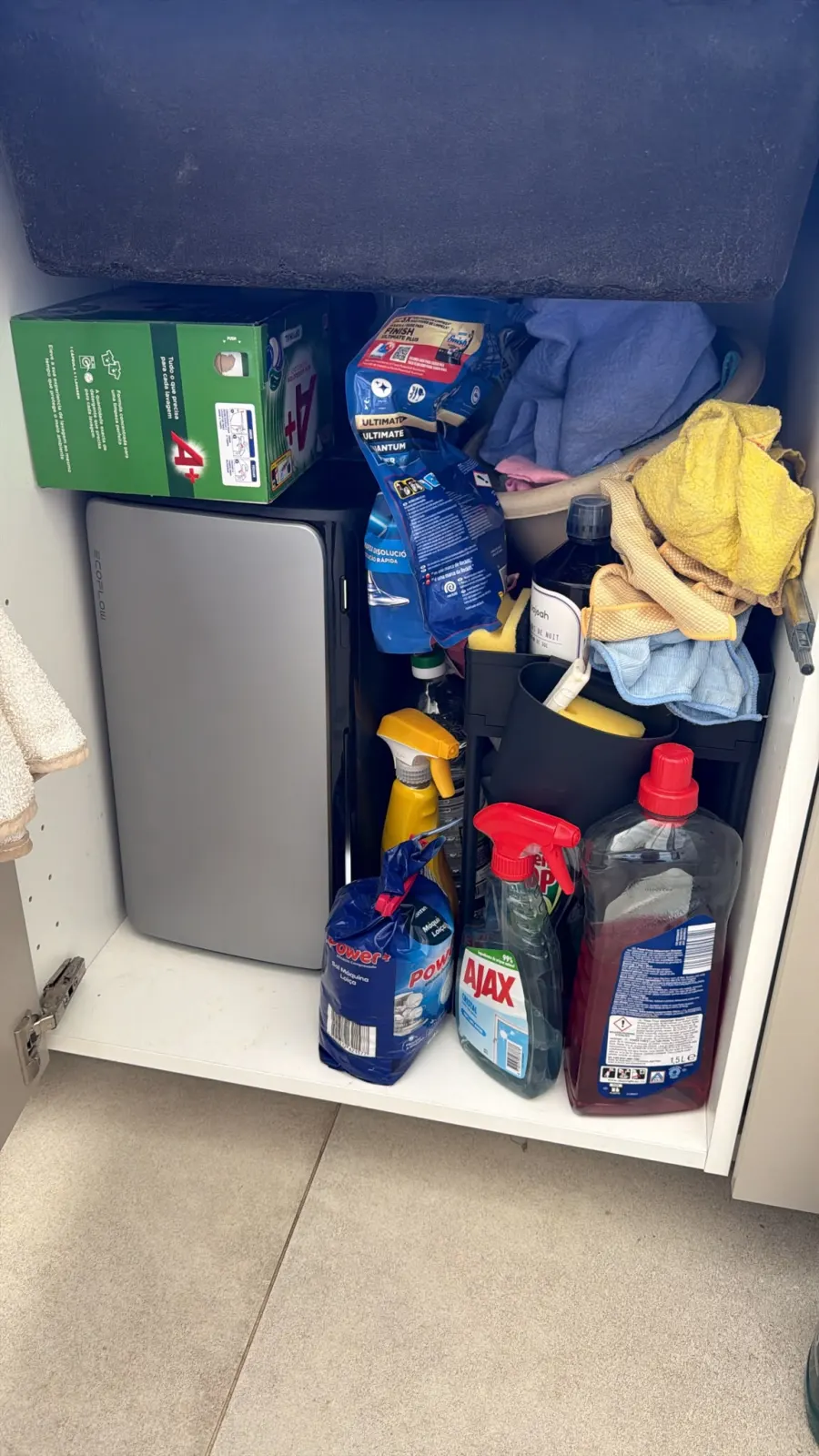
My mate keeps sending me his feedback from the field, and honestly a couple of things are worth a look. First, the AC Pro: he literally crammed it into the under-sink cabinet, wedged between the dishwasher salt, the Ajax and the cloths, wired to both the dishwasher and the washing machine. A completely closed space, without the slightest ventilation, in the middle of a Portuguese summer… and it doesn’t heat up. Zero temperature issues, right where I’d have bet on it overheating.
Next, a little test I love: he lined up the three EcoFlow panels and added a fourth, a no-name one, just to compare. And that’s where the quality shows. At peak sun, when it’s really hammering down, the voltage on the EcoFlow panels doesn’t flinch, while the no-name one collapses: it loses efficiency the moment it gets too hot. EcoFlow quality costs more, but you can also measure it, exactly when you need it most.
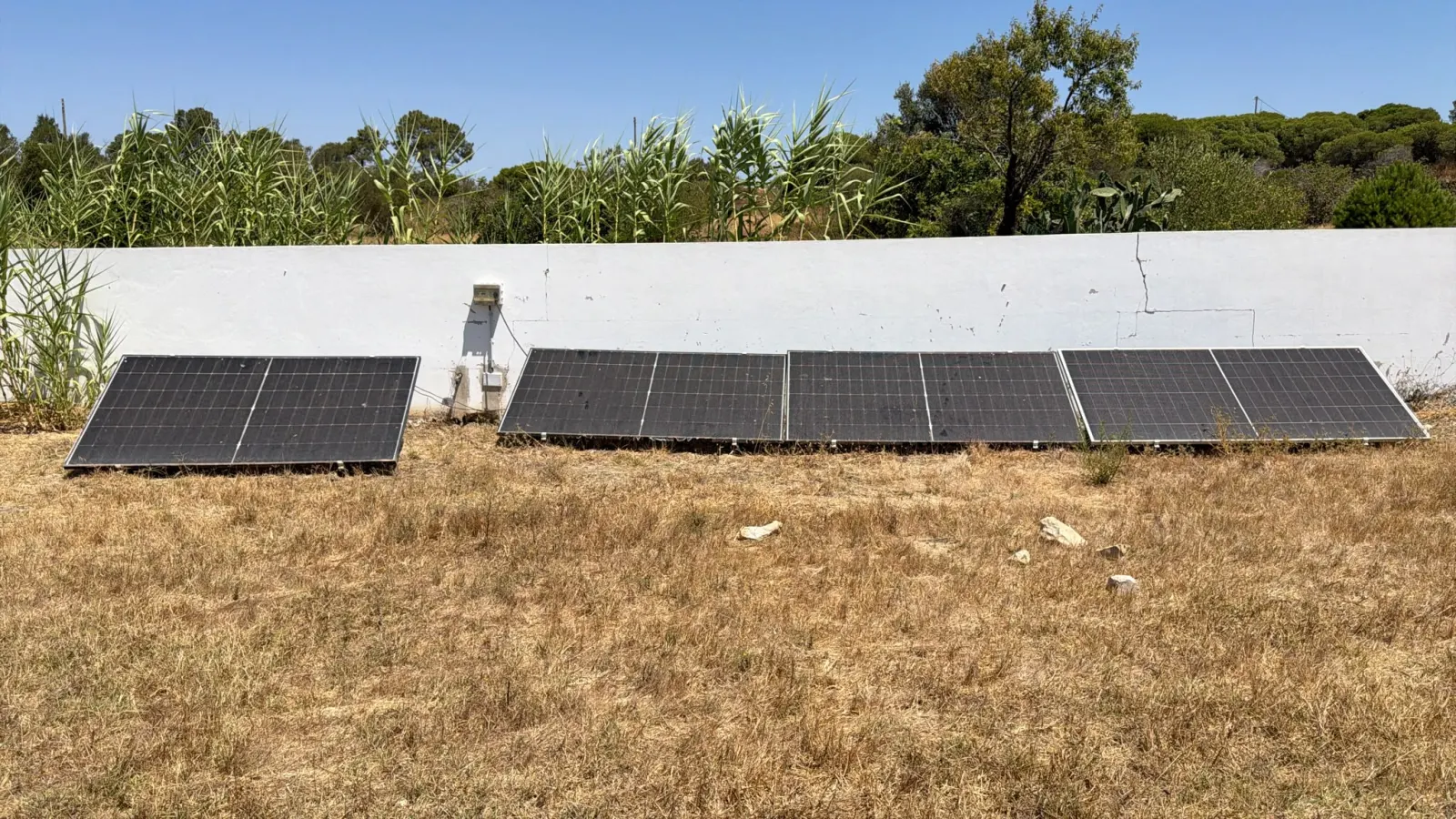
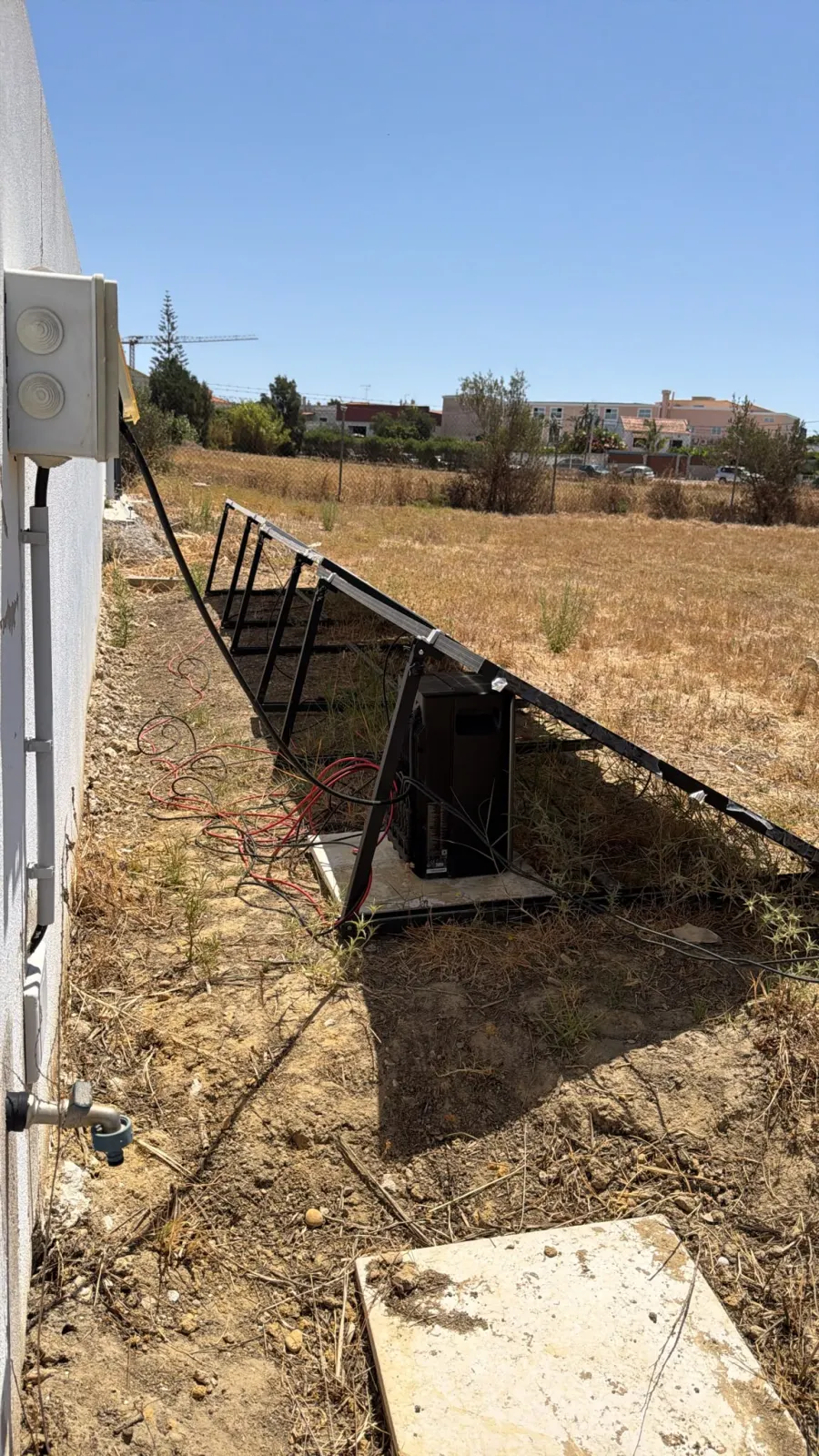
Finally, the Stream itself. Inside the cabinet, nicely sheltered, it stays cool. But sitting outdoors on a slab under a panel (so in the panel’s shade, mind you), it does warm up a little. Nothing dramatic, but it wouldn’t hurt for EcoFlow to offer a small protective box for the battery outdoors, because in this kind of setup one of the batteries does have to live outside.
The EcoFlow app: your ally for managing all your energy
If there’s one thing I find great about EcoFlow, it’s their app. It has always been well thought out to manage all their products (unlike other brands, where I still struggle to connect certain batteries). And with the Stream kit, you can tell they’ve stepped it up.
Ultra precise and intelligent management
Installing the Stream is of unbelievable ease. You activate Bluetooth, launch the app, add the device, connect it to Wi-Fi, and it’s done. No complicated settings, the interface recognizes everything immediately.
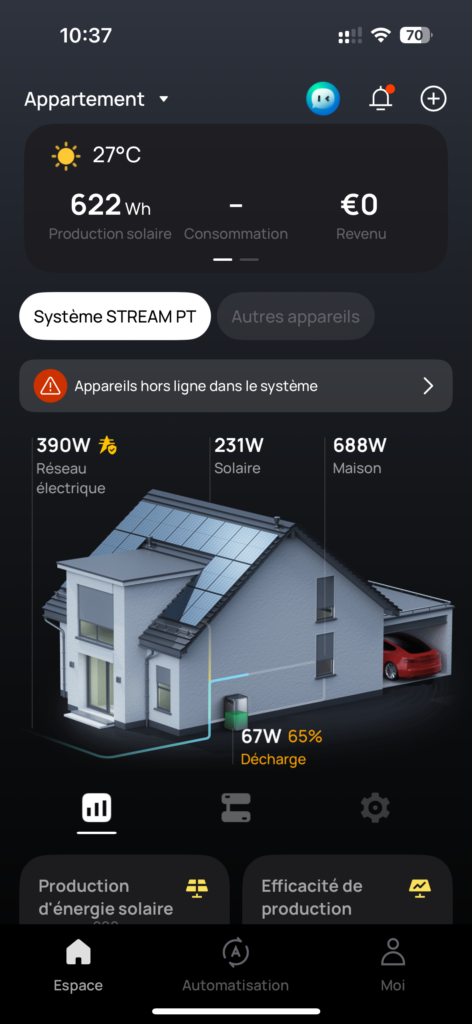
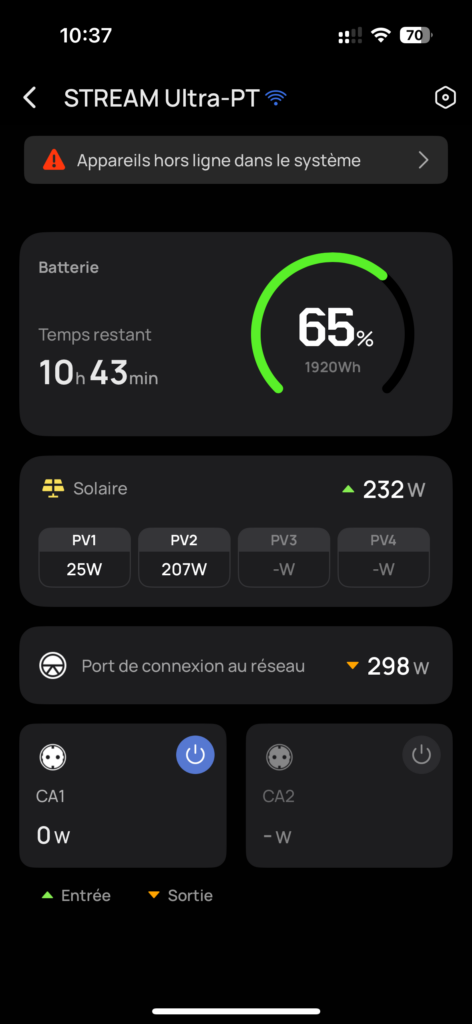
From the app, I control each element of the kit: batteries, panels, micro-inverters. It analyzes in real-time what I produce, what I consume, and how to optimize my savings. We have a very visual dashboard, like a “smart home,” showing solar production, grid consumption, home, and battery, each with its precise values in W or Wh. A concrete example: I was able to observe over 10 hours of autonomy at 65% battery, and an instantaneous combined production of 232 W (of which 207 W on the PV2, proving that the system is truly readable).
What exactly are the functions of the app?
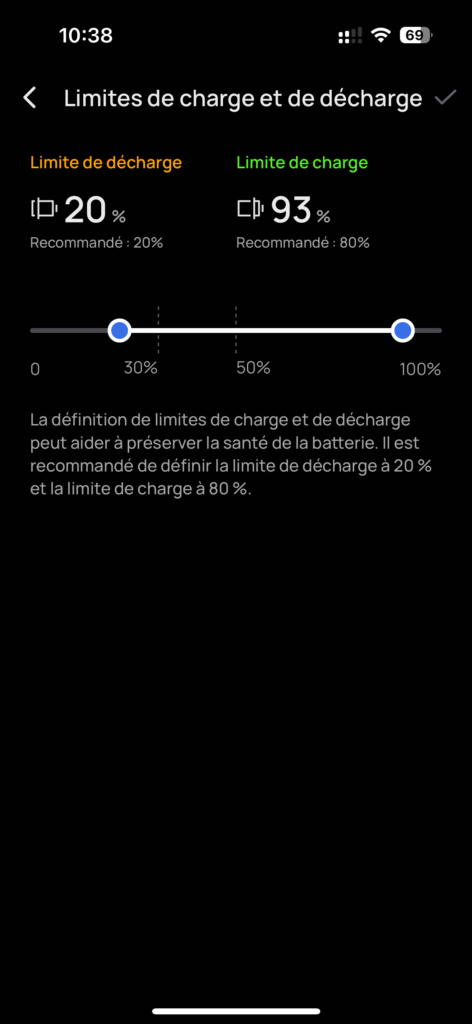
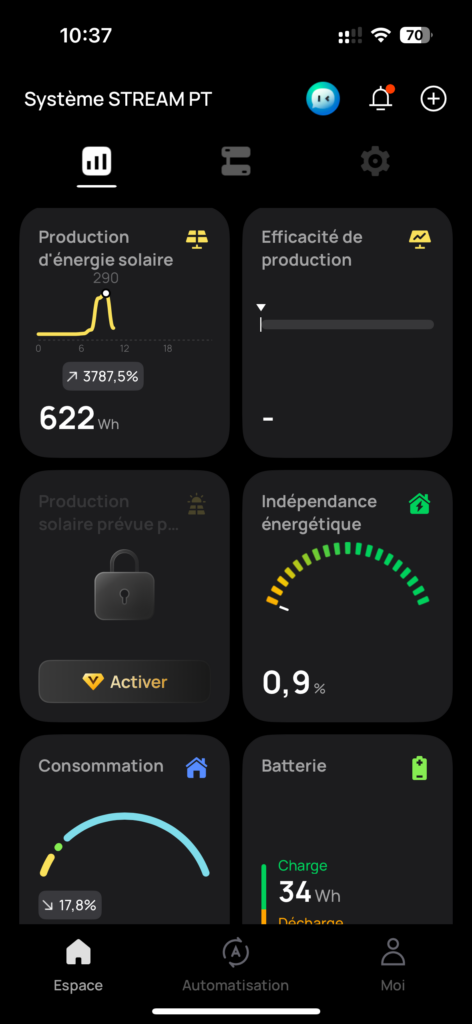
- Real-time tracking: solar production, consumption, savings made, energy efficiency, and battery charge status. You can see, like in my case, the remaining autonomy, discharge power, and estimated energy independence in %.
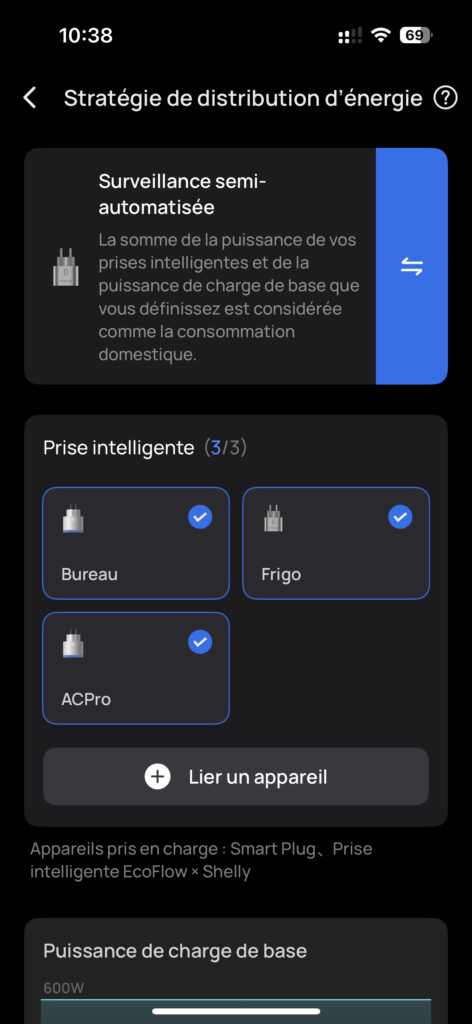
- AI-driven balancing: automatically redistributes energy between units to avoid outages (for example, for the fridge or office AC, which I’ve connected via EcoFlow/Shelly smart plugs).
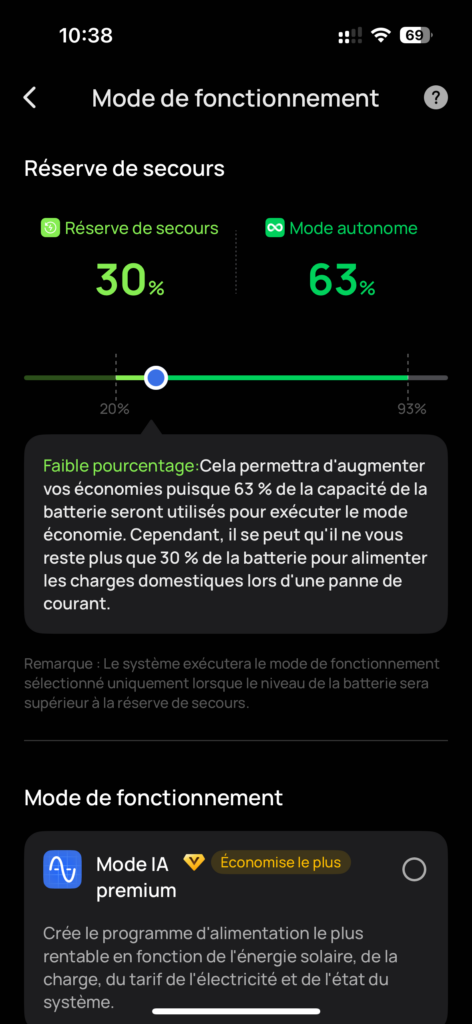
- HP/HC Mode (Peak/Off-Peak Hours): analyzes hourly prices (Nord Pool, Epex Spot, etc.) to charge when it’s cheaper and supply when it’s more expensive. This is crucial if you live in an area where electricity prices fluctuate a lot.
- Solar and weather forecasts: integrated via Solcast, with geolocation, satellite imagery, and historical data. This block remains locked without a subscription, but you can visualize it.
- Control of smart devices: compatible with smart plugs (Shelly, Tibber…) to automate the use of solar surplus. For example, I’ve assigned the AC Pro, fridge, and my office to these plugs to manage their priorities automatically.
- Integrated AI assistant: identifies inefficiencies, analyzes data, and provides recommendations to improve performance. This is what they call the “Premium AI Mode.”
Real peace of mind
What I appreciate most is that the app does the complicated work for me: no calculations, no guessing. It gives me clear information, guides me, and in the end, I enjoy my solar installation peacefully, without having to become an energy engineer.
Small downside: the AI becomes paid
For some time now, the app has introduced a subscription system to unlock certain “Premium” functions, including the famous AI Mode designed to automatically optimize charging and discharging based on the weather, rates, and system status. For now, I haven’t activated it. I don’t have an immediate need for it, and I have real doubts about its actual relevance. We’ll see if this subscription logic becomes established or if it remains a marginal gadget. Personally, I’m staying cautious.
My opinion on the EcoFlow Stream (after almost a year)
If I had to sum up the EcoFlow Stream in two words? Beautiful and smart.
Honestly, when we think “home battery,” we imagine an ugly, industrial block that we hide in a corner. And here, EcoFlow has managed to produce a stylish, sleek, almost designer product, the kind of object you can leave visible without it being shocking. It’s rare, and it’s really pleasant on a daily basis.
But beyond aesthetics, it’s mainly the intelligent aspect of the system that blew me away. Playing with European regulations (the famous limit of 800 or 900 W) by separating uses is simply brilliant. We legally inject via the micro-inverter, while still keeping the option to use the same battery to send up to 2300 W to larger devices. It sounds obvious when put this way, but it took some thought.
So yes, some will say that it’s expensive, and that’s true, especially compared to a DIY installation set up with your own MPPTs and cables. But let’s be honest, it’s not the same target. The EcoFlow Stream is aimed at those who want a clean, elegant, and easy-to-install setup, without the hassle. In this category, in terms of ease, efficiency, and return on investment, good luck finding better.
And this is just the beginning; I will continue long-term testing. I will update this article throughout the seasons (my friend will send me his autumn and winter readings), so feel free to check back or follow the channel for real-world feedback.
FAQ: EcoFlow Stream, your frequently asked questions
Stream, Stream Ultra, Pro, Max, AC Pro: how to make sense of it all?
Can you install the EcoFlow Stream yourself, without an electrician?
Do you need to notify the grid operator, and does it work with a smart meter?
Does the Stream work in case of a power outage?
Is it compatible with Home Assistant or home automation?
Does it hold up in winter, in extreme cold?
Self-consumption only or resale of surplus possible?
What is the actual battery life?
PS: if you’re still wondering if it’s worth it, just know that I carried 25 kg of battery up to the third floor without an elevator, just to tell you that it’s silent. Dedication, that’s what it is.
Our gear tests, in real conditions
Batteries, solar, conversion, security. What we found after months of real use, and what we would not buy again. An email when we have actually tested something, not before.
Ce que vous souhaitez recevoir :