


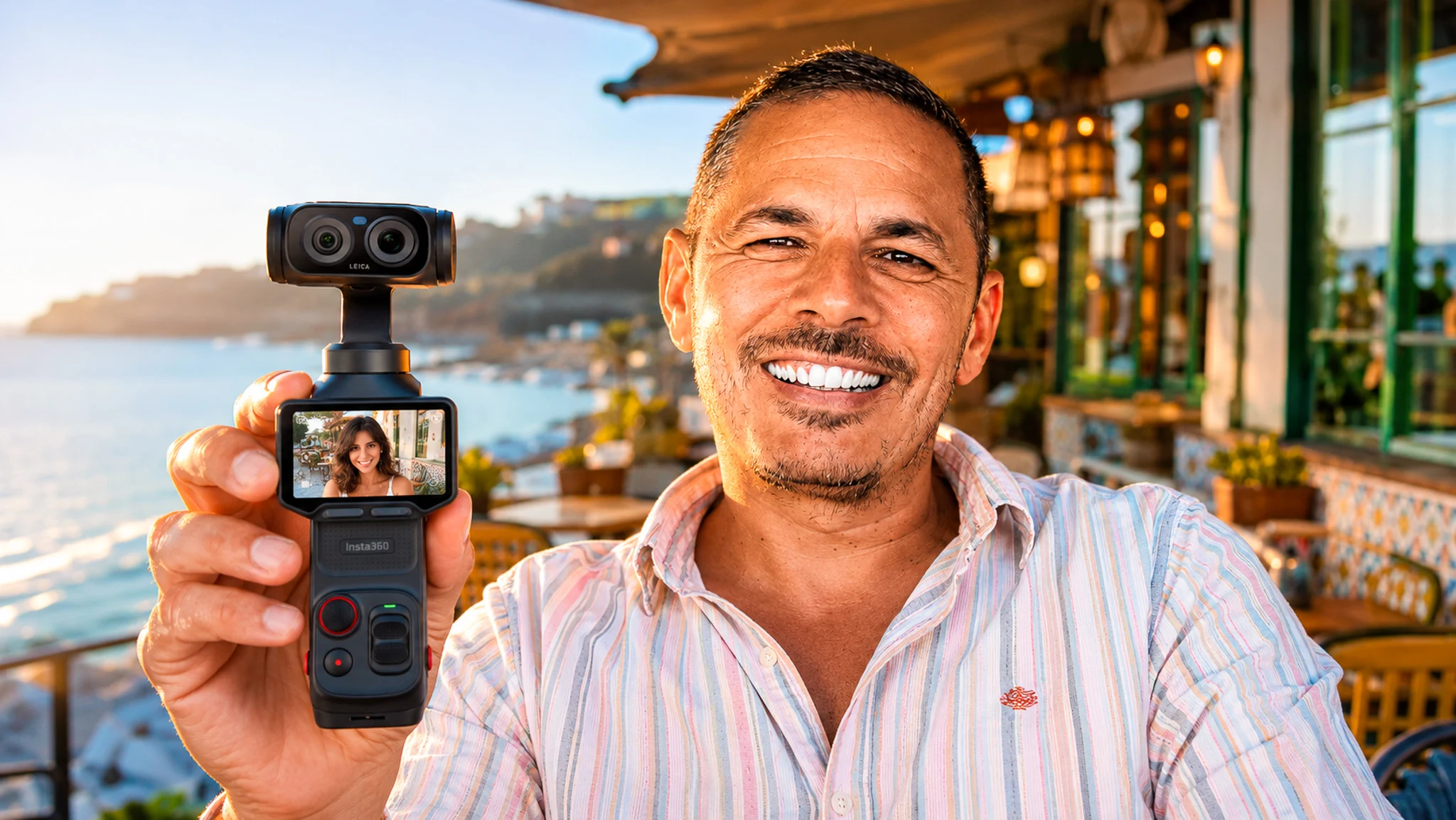
Well, let’s start with the thing that will tell you everything you need to know about this article: Insta360 contacted us to become partners, they offered us a 360 camera, I asked if I could have a Luna Ultra instead, and they said no. So we bought it. With our own money (yes, the one that usually goes to fill up the camper van).
So of course, when you pay over 700 euros out of your pocket while the brand was sweet-talking you, you become a little less accommodating.. I would be even more uncompromising, even more so, I want to say. It’s been two months now that it’s been with us, and here’s what happens when you stop reading technical sheets and start filming for real.
Two months, that’s Scotland in August, the medieval festival in Castro Marim until late at night, it’s restaurants, product tests in the camper van, and a few scares (including one where I almost blew up the camera all by myself, we’ll get to that).
Our verdict on Insta360 Luna Ultra Camera gimbal 8K Leica
Benefits
- 1" dual lens + Leica co-designed telephoto, 8K video: image quality above the rest
- Integrated 3-axis mechanical gimbal, no need for a separate stabilizer
- 2" detachable touchscreen: discreetly film yourself (restaurant review, solo vlog)
- 233 g and pocket-sized: designed for vanlife, travel, and cabin baggage
- 4 built-in microphones + compatible with Insta360 wireless microphones (Mic Air / Mic Pro)
Disadvantages
- Starting price that feels like a classic action camera
- Brand new product: ecosystem of packs and accessories still young
- High demand at launch, risk of stock shortage
For a creator or a travel duo looking for a single finished, stable, and compact camera rather than a bulky hybrid, the Luna Ultra is an obvious choice. We ordered it ourselves to replace our Sony, which says a lot.
Our little camera graveyard, and the thing that was missing every time
Since we started creating content, we’ve had a few. A GoPro, phones, and especially the Sony ZV-E10 which was the oldest, so the one we used all the time. Except there was always a problem.. it was either that we needed a gimbal for stabilization, or something else was missing, but there was always something missing (and every time you think the next purchase will solve everything.. spoiler, it won’t).
The GoPro, the battery life on this kind of camera is a disaster, you shoot three shots and it’s already on its last legs. The ZV-E10, a very good camera, stunning image, but it’s big, you always needed a tripod, and since we got it without a lavalier mic, the base sound was a bit rubbish. The stabilizer gimbal for phones, same punishment, it becomes bulky and drains way too quickly (Caroline couldn’t hold a three-hour live without it giving up halfway through, try explaining that to your audience).
So I had been looking at pocket cameras for several months. And then I see Insta360 releasing the Luna, I see the specs, and at that precise moment they contact us for the partnership. The timing was too good.. we still had to pull out the credit card.
The real reason for this camera’s existence is that you don’t see yourself filming
If there’s one thing I didn’t anticipate when buying it, it’s this, and it has become the number one reason why it never leaves the bag.
The problem with the ZV-E10 is that it’s immediately obvious that you’re recording. You have a big pole, which is almost a camera tripod, and from there you’re no longer someone eating at a restaurant, you’re a guy filming. The people at the next table stare at you, the waiter becomes weird, and the authenticity you were looking for is dead before the first shot.
Here it’s much more discreet. Pocket cameras like this, they change the game, because they’re discreet while being of very good quality for vlogging. And discreet, in our job, doesn’t mean shy.. it means people stay natural in front of you.. and that’s exactly what we’ve been looking for for years without being able to articulate it.
The restaurant, our number one use case, and how we really film it
This is the thing we promised to test in July, and it’s the one that works best. With the little tripod built into the camera, you set it up on a corner of the table, you film yourself giving your thoughts on what you’re eating, with the mics, and it’s once again very discreet.
But the real trick is the duo. You add to that the GO Ultra placed on your chest, to get the shot of the waiter serving the dishes, and you have several different shots without needing a technical crew, and without scaring the staff with equipment (because that’s the real issue, no one wants to work under the gaze of a production).
Scotland in August: it filmed, but it wasn’t alone
Let’s be clear right away, because it’s the kind of detail they forget to tell you in reviews: the Luna Ultra was not the only camera on the trip. There was the GO Ultra, there was the X6, and there was the phone for a few stories. A camera that does it all still doesn’t exist.. and beware of anyone who tells you otherwise (sorry, but someone had to say it).
And there’s a very concrete reason for that, it’s the rain. It may not be waterproof, but we know the Scottish weather.. if there was a downpour we didn’t take it out, we took out the X6 instead. For very light rain, it can handle it. It’s a material trade-off, not a bet on the case’s resistance, and I’d rather tell you this way than make you believe it can handle everything.
The zoom, the one that sparked all the debate
The concrete case is from Stirling Castle, pointing to the Wallace Monument tower on the other side of the valley. And the reverse from the monument to the castle. So yes, it’s usable, even if it’s not something I would use all the time.
My stance on this hasn’t changed: a hardware zoom is good, but when it’s software, I prefer what is native. On the Luna Ultra you have both, a real second lens for the first notches, then lossless, then hybrid when you push it to the end (and that’s where I get off the train, personally). The argument I find most interesting and that no one articulates is that this zoom is supported by a mechanically stabilized gimbal.. so it’s still usable where a phone zoom becomes mushy as soon as you walk.
Stabilization and tracking, tested while walking for real
The stabilization, if you’re not a big jerk, works well. Sometimes it happens that it shows on the screen “you have reached the limits of stabilization”, but that’s when you make gestures that are way too abrupt (so when it’s a bit my fault, let’s be honest).
The tracking, however, has a limit that I haven’t seen written anywhere. When you touch the screen, you can define an area that you will select. Except that if you have an object in the foreground and that’s what you want to track, but there’s a face behind it, it will seem logical for it to follow the face rather than the object. That’s the only thing that made me redo shots.. and it’s logical from its point of view, a face is what a vlogging camera should prioritize (it’s right nine times out of ten, it’s the tenth that annoys). Nothing dramatic, but when you want to film a product and not your face, you realize it quickly.
Glasgow, the story of the mics, and the advice that comes from it
I’m telling you this because it serves more than a paragraph of specs.
We were at the University of Glasgow, sitting on a bench, with the camera placed three meters away and the remote control detached in hand. What I didn’t know yet is that the mics automatically disconnect when you don’t use the camera for a while, to save battery. So at the moment we started filming, the Mic Pro didn’t pick up.
What saved the sequence was the mic from the remote control, which recorded well, and the result wasn’t inaudible. Be careful, it wasn’t intentional at all (I wish I could tell you it was a clever test on my part, that would be false), it was a rescue. But yes, of course, it helped.
The night in Castro Marim: PureVideo warns you before switching
We did Castro Marim and its medieval festival, with a whole part at night, and even the night part looks great. This is where the 1-inch sensor serves a purpose beyond just filling a product sheet.
The behavior I liked is that you have nothing to manage. The PureVideo starts up by itself, and it warns you, it tells you that it doesn’t have enough light and that it switches automatically. You don’t discover in editing that you were filming in the wrong mode.
The verdict, I give it as I think, without embellishing: in low light, it’s honest considering the size of the camera. It’s honest. It’s not full-frame and it doesn’t pretend to be, but you bring back usable images from an entire evening, which our old little cameras simply couldn’t do.
For the detail curious, here is the complete technical sheet:
Technical specifications: Insta360 Luna Ultra Camera gimbal 8K Leica
| Color | Cosmic Black, Stellar White |
|---|---|
| Net Weight | 0.23 kg (0.51 lb) |
| Display | ✓ |
| Application | ✓ |
| Connectivity | Wi-Fi 6, Bluetooth, USB-C 3.0 |
| Storage | 47 GB internal + microSD up to 1 TB |
| Audio | 4 built-in mics + compatible Insta360 Mic Air / Mic Pro |
| Sensor size | 1" main sensor + 1/1.3" telephoto |
| Max video resolution | 8K at 30 fps (up to 4K at 120 fps) |
| Photo resolution | 37 MP (UltraPhoto), 200 MP panorama |
What really annoys me after two months (and it’s more subtle than the price)
So here I’m going to be precise, because it’s the only usage complaint I have, and it’s not the one you read everywhere.
The slider that allows you to move and the zoom might be a bit abrupt, they might go a bit fast. I prefer something softer, that feels more natural. Here when you zoom, you can tell you’re zooming. And the same when you want to turn the gimbal without turning your hand, by using the little joystick, I find it a bit fast.
Now, honesty requires: I think we can’t do better, I don’t see how we can do better with a control of this size. It’s not a manufacturing defect, it’s the limit of the exercise. But if you come from static video and you like slow movements, you’ll feel it from the first shot.
The wrist strap, my little scare, and the correction to make right away
At first, I had attached the wrist strap to the plastic protection. Except that one day I forgot that was the case, and when I opened the protection while the strap was on my arm.. I almost had the camera come out and go (the little white moment in my head, you know the kind).
So I changed it, and I put the strap directly on the camera, it seemed safer to me. It costs nothing, takes ten seconds, and if you just bought one, do it before your first outing.
The batteries, and something I still don’t understand
While traveling, battery life has never been a problem for us, but let me explain why: we always have a power bank, because we try to plan ahead. And while traveling you don’t come back all the time, so you just need to charge the camera while eating and it’s good to go again.
However, there’s one thing I haven’t figured out yet. I feel like when we want to charge everything, the extra battery plus the camera, it doesn’t work, and that you have to charge them one after the other. I’m giving this to you as a remark, not as a conclusion: I will need to dig deeper, for now I haven’t had time to explore the subject.
What’s really in the Creator Kit
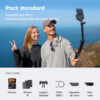
I took the Creator pack, so let me tell you what’s inside, it’s not written anywhere correctly. You have the camera, the plastic protection, and two connectors to increase the height of the support: the small one which is a tripod, and the second a bit larger which is a battery plus tripod. You have the little wrist strap (the one from my scare), which can attach either to the plastic protection or directly to the camera.
There’s also the USB cable, a mic with its windscreen, a magnet and the clip that goes with it, a wide-angle adapter in the form of a lens that magnetically attaches to the lens, and the pouch that contains the product.
What I haven’t tested, and why I’m telling you
A two-month test is not a complete test, and I prefer to list the empty boxes rather than blow smoke.
The I-Log, I haven’t tested it. And that’s intentional. In Scotland, the goal was still to be sure to get shots that are worth it, because I can’t go back. I will try the log here, to practice on everyday shots that are less important, before testing it in slightly more complicated cases while traveling (incidentally, that’s the advice I would give you too, don’t discover a color profile on the day of the shot you can’t redo).
The slow motion, hardly at all. Not even as a test, but not much more than that. You will read everywhere that slow motion caps at 1080p where the competition goes higher, and that’s true.. except that in my real life for two months, I never used it. So I’m not going to sell you something I don’t use as a drama. It’s up to you to see if it’s your use.
The detachable screen, the power-up, and where it lives when we walk
I use the detachable screen when it has a purpose. If I need to shoot in the camper van where I’m sitting for product tests, I use it and detach it. However, once again, the battery of the remote control, when detached, doesn’t last very long. It’s a momentary accessory, not something you leave detached all day.
On the power-up, there’s a nuance that’s worth mentioning. It turns on very quickly. When you wait a long time and it goes into total sleep mode, there’s a little moment to turn it on, but when it hasn’t gone into total shutdown, it still goes super fast. So yes, the famous cold start takes a bit longer.. but you do it in the morning, you turn it on, and the problem doesn’t exist for the rest of the day.
The rotation of the screen, on the other hand, is great. Switching from one mode to another in a second is fantastic, and when you alternate between landscape for the article and vertical for social media, it matters more than you think.
And for transport, it can be in the bag or in the pocket. I even manage to slip it between my fanny pack when I wear it at my waist and my body, to draw it faster (it’s probably ugly to see, but it works).
The real question: does it replace a hybrid?
Here’s the passage you won’t read from people who are sponsored, so I’m putting it all here.
I record a lot of my tests with my Lumix and its 50mm. And the Lumix, it takes so long to set up.. I have to put the little adapter for the mic, which I have to plug in with a jack, it’s still heavier, and in the end for a test, last time I remarked to myself: I’m so much faster with the Luna.
But, and this is a real but: indeed I lose a bit of quality. And the same with the ZV-E10, there’s still a little quality loss. So no, it’s not a pure and simple replacement for a hybrid, it’s a trade-off. You exchange a bit of image for a lot of time and a lot of discretion.. and personally, over two months, the trade-off is largely in my favor.
And in our job, the shot you managed to film is always better than the beautiful shot you didn’t film because you were busy screwing a tripod (I often remind myself of that).
So, the best camera for traveling? It depends on what you’re filming
Against the competition, the Luna Ultra has a clear positioning: in stabilization it holds its own against the DJI Pocket, but it gains an advantage with its detachable screen and its second lens, two things the Pocket doesn’t have. On the other hand, DJI maintains the advantage in 4K slow motion and a more mature autofocus.
And within the Insta360 range itself, three models compete for the traveler’s bag without playing the same role. We’ve put them head to head.

I'm Xavier
I test gear over months, in the van and day to day, and I say what doesn't work. If that saves you one bad purchase, leave me your address.
Ce que vous souhaitez recevoir :
Luna Ultra vs Ace Pro 2 vs GO 3S: which travel camera?
£649,00
See the product
|
£345,00
See the product
|
£284,99
See the product
|
|
|---|---|---|---|
| Net Weight | 0.23 kg (0.51 lb) | 0.18 kg (0.40 lb) | 0.04 kg (0.09 lb) |
| Application | ✓ | ✓ | ✓ |
| Connectivity | Wi-Fi 6, Bluetooth, USB-C 3.0 | Wi-Fi 802.11a/b/g/n/ac (2.4/5 GHz), Bluetooth BLE 5.2, USB-C | Wi-Fi 802.11a/n/ac (5 GHz), Bluetooth BLE 5.0, USB-C 2.0 |
| Storage | 47 GB internal + microSD up to 1 TB | microSD up to 1 TB | 64 GB or 128 GB internal (no microSD) |
| Audio | 4 built-in mics + compatible Insta360 Mic Air / Mic Pro | 2 mics, wind noise reduction (clip-on windscreen included) | Wind reduction, stereo, directional enhancement, 48 kHz/24-bit AAC |
| Sensor size | 1" main sensor + 1/1.3" telephoto | 1/1.3" | 1/2.3" |
| Max video resolution | 8K at 30 fps (up to 4K at 120 fps) | 8K (7680×4320) at 30/25/24 fps, 4K up to 120 fps | 4K (3840×2160) at 30/25/24 fps, 1080p at 200 fps (slow-mo) |
| Photo resolution | 37 MP (UltraPhoto), 200 MP panorama | 50 MP (8192×6144) | 12 MP (4000×3000) |
| Zoom | 1-12x (photo and video) | 2x (clarity zoom) | - |
| Stabilization | Mechanical 3-axis gimbal | FlowState + 360° horizon lock | FlowState + horizon lock |
| Battery life | 240 min | up to 180 min (endurance mode) | 38 min (camera) / 140 min with Action Pod |
| Dynamic range | 14 stops (10-bit I-Log) | 13.5 stops (PureVideo, Active HDR) | - |
| Colour profiles | Standard, Dolby Vision, 10-bit I-Log | Leica profiles (Natural, Vivid, B&W) + I-Log | Standard, Vivid, Flat, Portrait |
| Dimensions | - | 71.9 × 52.2 × 38 | 25.6 × 54.4 × 24.8 |
| Waterproof Rating | - | 12 m without case, 60 m with dive case | 10 m camera only, Action Pod IPX4 splash-resistant |
| Video Compression | - | - | H.264 (up to 120 Mbps) |
To sum up our take: the Luna Ultra is for relaxed vlogging, clean shots, restaurant reviews, and city strolls where you film yourself nicely. The Ace Pro 2 remains the queen of action and low light when things are moving and it’s dark. And the GO 3S, tiny and magnetic, is for hands-free POV for immersive shots. For us, for our travel and restaurant use, it’s the Luna, no question.
Price, promo code and where to get it
The Luna Ultra comes in several packs, choose depending on whether you just want the camera or all the gear. The price updates automatically below, so no outdated prices hanging around (and yes, it is a budget, we won’t lie, it’s even its most objective flaw).
Insta360 Luna Ultra Camera gimbal 8K Leica promo code
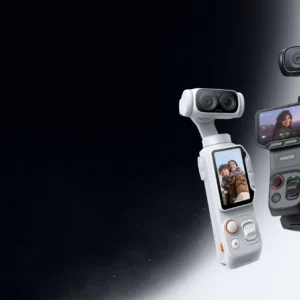 In stock
Insta360 Luna Ultra Camera gimbal 8K Leica
VANTOUR*
*Verified price on 10 September 2026. The final price may vary.
By using our partner link, you get the benefit of the Insta360 promo code VANTOUR which gives you a free accessory. And if the code ever gets stuck, we’ve detailed all the tips on our page dedicated to the Insta360 promo code.
Do we recommend it? Who is it for, and who isn’t it for
If you’re a travel content creator, solo vlogger, and you want great footage without breaking the bank on a big camera body or carrying a bag of gear, it ticks pretty much all the boxes we’ve been looking for for years. It’s the ‘I pull it out, I grab the moment, it’s clean’ tool (and for events, the second lens does the job).
If, on the other hand, your thing is big 4K slow-motion, pure photography, extreme sports or diving, then look more towards a DJI Pocket, an action camera or a 360, it’s not the same job. And if you’re really filming in the rain, plan for a second camera, like us.
The verdict after two months is this, and it’s worth what it’s worth coming from someone who paid for it: for now, there’s nothing that annoys me. When I see the amount of gear we’ve had, the stabiliser we put phones on, the tripods we’ve had to go through… after two months, it’s a great investment. We’d got into the habit of telling you about our gear tested on the road, and this one will be no exception.
Your questions about the Insta360 Luna Ultra
Does the Insta360 Luna Ultra replace a hybrid camera?
For video and vlogging, largely yes: it combines image, mechanical stabilization, sound, and a control screen in a single 233 g body, whereas a hybrid requires a stabilizer and an additional microphone. That's exactly why we chose it after the death of our Sony ZV-E10. However, for pure photography, a hybrid with its lenses remains more versatile.
Is it really a good camera for traveling and vlogging?
For a travel content creator, this is one of their best playgrounds: 233 g, pocket-sized that fits in the cabin, detachable screen for solo filming, 3-axis stabilization, and finally decent low-light performance thanks to the 1-inch sensor. You can whip it out faster than your phone to capture the moment, and that's exactly what we were looking for.
Does the Luna Ultra film vertically for social media?
Yes, but let's be honest: there is no native vertical mode at the time of writing. The camera crops the image (we switch to 3K), which is still very good for reels or TikToks, but we would have liked a true full sensor vertical mode. This is one of the points that an update could improve.
Luna Ultra or DJI Osmo Pocket: which one to choose?
On stabilization, it's a tie, impossible to separate. The Luna takes the lead thanks to its detachable screen and its second lens (telephoto with a nice background blur), two things that the Pocket lacks. On the other hand, DJI maintains the advantage with 4K slow motion and a more mature autofocus. For our travel vlog and restaurant use, we preferred the Luna.
Insta360 GO Ultra: our field test of the hands-free POV mini camera
Well, we need to talk about this little pebble. Filming alone, without a tripod, without your hands being busy, keeping your eyes on what you are doing rather than on...
Read also
Insta360 X6: we had turned down the X5, here’s what made us change our minds
We said no to this camera. When Insta360 offered us the X5 a few months ago, we declined: the bulging rendering, the rounded edges, the characters posed on tiny planets,...
Read alsoTested first, recommended after
Batteries, solar, conversion, security. What we found after months of real use, and what we would not buy again. An email when we have actually tested something, not before.
Ce que vous souhaitez recevoir :